Friday, November 19, 2010
Why are we still teaching?


Tuesday, October 26, 2010
Facebook Safety
Facebook’s privacy breach last week serves as a reminder of the potential dangers of social networking. Canada’s Privacy Commissioner expressed “major concerns” after Facebook’s application makers leaked the personal information of tens of millions of users to Web trackers and advertisers.
One common Facebook scam is for a criminal to track a victim’s online behaviour, hack into his social networking account while he’s on vacation, then use the victim’s profile to tell his friends he has been robbed and needs a money transfer.
“It happens quite often, more than you’d think,” Mr. Krehel said. Hackers sell stolen Facebook passwords online for as little as 25 cents each.
Sharing images and videos online can also make you vulnerable, Mr. Krehel said. BlackBerrys, iPhones and many high-end digital cameras are GPS-enabled and can record so-called metadata on image and video files, which can reveal when and where the files were captured, leading thieves straight to your home. While some websites will automatically strip out this information, you need to be very careful when sharing photos and clips online.
Mr. Krehel identifies several steps to protect your identity online:
Avoid quizzes and apps: They’re fun and they’re free, but they share your personal information with marketers, tracking companies and who knows what else.
Use “strong” passwords: Passwords should include numbers, letters and symbols and should be changed regularly. Use different passwords for your social websites, personal life and financial life, so that if one of them is breached, the rest are still secure. If you can’t remember all your passwords, use a secure program for their storage, such as Password Safe.
Keep a close circle of friends: Don’t accept friend requests from strangers in a misguided attempt to pad your social network numbers. Once these people befriend you, they can post malicious links on your page, compromise your computer’s security and spread viruses to all your friends. They can also gain access to your whole mailbox, including e-mails from financial institutions.
Surf at home: If you’re using a public computer, don’t expect any privacy. You don’t know how many viruses are on the computer, who’s controlling it or who could be copying your information.
Beware of links and images: Hackers often use pictures of celebrities to lure their victims; clicking on such links allows hackers to install malicious codes on your computer. A recent study found that organized criminals create approximately 8,000 malicious websites every day.
Secure your mobile device: If you use social site plug-ins on your cellphone, turn on some basic security features and add a password. If you lose your phone, your online identity is not left open to whoever happens to find it. If your phone has a camera, consider turning off the metadata or geotag function. Check your phone’s manual for instructions.
Tuesday, October 5, 2010
Rolling your own wireless solution.
Tuesday, September 21, 2010
Google Calendar
Thursday, September 9, 2010
Filtering or Not? Good Question isn't it?
After reading this article about a Wisconsin school district, I see things a little different after reading his reviews of why should we filter. I still think that filtering during school is very well needed but when they go home and off of school property, let watch what they want. But if it is on school property I don't believe they should be able to for the fact that when they go to a site and get spam on a pc, the students or staff don't have to fix it. The technology manager does. To me we still need to keep filters but the Technology Director of this Wisconsin school thinks different. Whats your thoughts?
Saturday, August 28, 2010
Monday, August 23, 2010
Getting Ready for the New Year
At the middle school we have brought in a new lab also, not new to the district but to the Middle School, since we replaced the lab at the High School. Which bring the students up to Windows XP and Office 2003. Still not the latest but very close to what they will encounter at a work environment. Also they will have access to our three COW's at the library that does have Windows 7 and Office 2010 so there they do have the access to the latest items. Also in the Middle School we have teachers who have gotten new tablets, which are like notebooks but without paper. These items will allow our teachers to move around their room and still use their computer and projector to show the kids examples. I haven't gotten a chance to use these but I have heard a lot of good things about them so I don't know all the capabilities. Also we got new document cameras for a few of our teachers which is very exciting for them. Again we have really tried getting the newest and latest technology for our staff and students.
Now at the High School we haven't gotten as much but still have gotten some great tools. We did end up with a new computer lab for various programs and classes here at Emmetsburg High. With these new machines we will be able to do more with less time. Also our staff did get new computers here too so everyone at the High School with be with Windows 7 and Office 2010.
This summer has been full of new items, computers to cameras and software. We have gotten so much new software that I don't have enough time and usage to post anything good or bad about it. But we are looking at some online courses, new special education programs and so on. Hopefully I will know more about the programs on my next post and give you an update on them and my likes and dislikes.
Also I would like to thank my assistant this summer for all his hard work. He has been really great to have on board and hopes to have him more time from now on.
Thursday, June 3, 2010
Long Time No Post
Also with knowing what websites to watch for and keep away from will help a lot. I can't name them all because I don't have that much time.
Friday, May 7, 2010
The IPad, not just for Kids?
This is pretty funny. Just think -if a cat can use it, what can a beautiful mind do?
When are they going to need this?
Thursday, May 6, 2010
Facebook for sale? I think not...
Facebook for Sale
Tuesday, May 4, 2010
Principal wants to block Facebook...Completely
Tuesday, April 27, 2010
Homework or not?
Wednesday, April 21, 2010
Homework done in the classroom, while lesson done at home?
http://thefischbowl.blogspot.com/2010/04/transparent-algebra-homework.html
Monday, April 19, 2010
Should we really be blocking social media?
This article discusses the unintended negative consequences of restrictive internet filtering policies in education, government and business. Here's the main point from the first two paragraphs:
"Humans have a natural proclivity to want what they cannot have. Our insatiable appetite for sharing information, combined with the nearly limitless ways to access the web have thus far frustrated the most sophisticated attempts to block access to social media services.
From the Great Firewall of China to the public schools of Britain, IT security experts are finding that restricting Internet access can have the unintended consequences of civic backlash, poor worker productivity, and students unprepared for cyber threats."
And here's his point regarding content filtering in schools:
"My own university bans the Internet in some large lecture halls. Yet, when I wander in back of the room before lecture, I see students hunched over cell phones, the signature blue and white colors of Facebook, and an inordinate number of students camped out near the perimeter of the hall, where a weak wi-fi signal permeates the room.
Meanwhile, some schools in Britain have chosen to “lock down” their systems, allowing access to only verified websites. However, a report from their government’s department of education found that “this approach had disadvantages in the schools visited. As well as taking up time and detracting from learning, it did not encourage the pupils to take responsibility for their actions.”
Additionally, children were less likely to understand proper Internet safety when outside of school. By contrast, in those schools that took a more educative approach to e-safety, teachers could use incidents of phishing, cyber-bullying, and inappropriate material as a way to discuss how such encounters should be dealt with in the future. Indeed, in at least one high school where cell phone use was part of the curriculum, the principal noted that inappropriate use of technology is exceedingly rare."
In other words, blocking access to social media sites may ultimately prove more distracting — and potentially more dangerous — to students."
Tuesday, April 13, 2010
Roll Up Laptops
My thought is, is that it would be the greatest thing ever, but it might be more for things to go wrong. Take a look at the video and discuss it below if you would like.
Wednesday, April 7, 2010
Classjump
So everyone has a computer, now what? and Bytespeed
iPad in Education
Today we attended a conference on 1:1 laptops in schools. My first seminar was on the iPad, which was released this last weekend from Apple. First of all, all it was, was a big sales pitch on the iPad and first of all it was suppose to be about using it in education. Not a thing was taught on how to use it in education. That's because no body knows how to use it yet since it's so new. But my thought on the iPad is that it would be a bit harder to use them. Since they are most of a device that a tool, that's my thought. I say that because since they are more for fun and not learning. First you would have to really watch what you do on it since you can't put on an anti-virus software. Second of all, there isn't quite all the apps out there that are going to work very well for education. Also, how do you keep your students from going to the app store and downloading games and other apps that aren't needed. I didn't really catch a lot of this presentation since it was everything that I have seen on t.v. commercials and on the internet. But to me I don't think that is will work very well in a 1:1 environment. Still looking at PC over Macs.
Monday, April 5, 2010
E-hawks on Facebook
Thursday, April 1, 2010
Visual WikiPedia
Electronic Devices or Not?
Google or Topeka?

Since today is April 1st, also know as April Fools Day, Google has decided to play a trick on us. Instead of having a neat Google logo up top, they changed it up a little today and put Topeka. You can read all about it name changing at Google's "Why We Changed Our Name".
Wednesday, March 31, 2010
Wi-Fi or...The bigger picture...
Tuesday, March 30, 2010
Future of the schools...
- How are young people changing as a result of digital media?
- How should learning environments change?
- How should learning institutions change?
- What can we do with this back in my school organization?
Here is a short video of The School of One.
Program Overview from NYCDOE Teacher Development on Vimeo.
Resources found at 1:1 Schools.net
Monday, March 29, 2010
Copy from 1:1 Schools
I thought this might be a good post for someone to take a look at.
What do our students need to learn? Feedback wanted!
I frequently have conversations with educators about transforming schools. Our conversations often focus on how many of the things that are currently taught at schools aren't very relevant. So what should today's students learn?
As schools move to one to one, it presents a great opportunity for schools to address this question. I'm curious to hear your feedback about what things you think students should be learning. Hopefully, many of you can find a couple of minutes to contribute to this conversation. I've included some questions that might get you thinking.
Is it important for students to memorize things that they can find on an internet search in 5 seconds?
Do students need to know how to use cursive handwriting?
How much time should be spent memorizing math facts?
How much time should be devoted to teaching spelling?
How much time should be spent with factual recall?
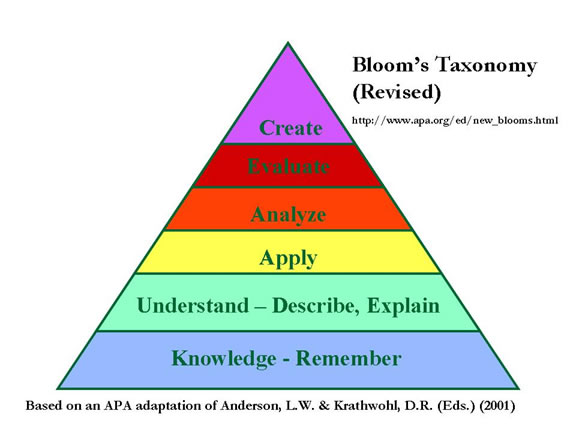
Where on Bloom's Taxonomy should most learning take place?